
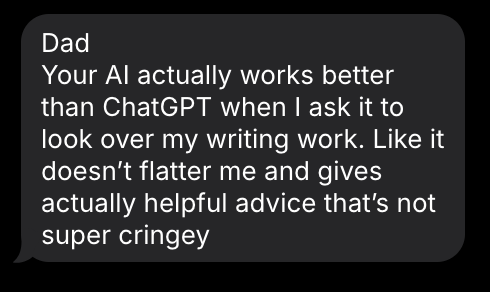
One of my kids texted me this a day after moving their projects from ChatGPT to the local AI stack I've been building on my homelab over the past couple of weeks. When your kid tells you the thing you built works better than a $157 billion company's, you need to take a moment to revel in it.
This post is a dive into what it took to get there.
Why run your own AI?
Learning There's only so much you can learn from cloud APIs. I'm the kind of person that learns by taking apart the clock and putting it back together versus reading a book about the theory of clocks. I've tinkered with local models before, but the performance was never good enough to switch any real use cases over, and where I learn best is when the system is pushed past its limits in the real world. It's one thing to read about parameter sizes and quantization levels, but until I see the actual memory pressure and token speed while running a variety of parallel workloads, it just doesn't click for me. Same reason I just had to try to partition my family's Gateway 2000 to dual boot Linux and Windows 98.
Children I firmly believe computer-age children should be using AI frequently and that we are doing their future a disservice if we simply block access to it. But I also am aware there are very serious ethical and safety concerns with children using AI, and a quick scan of the news shows what unmonitored access can lead to. I am a big fan of Salman Khan's vision of AI's role in education (Brave New Words: How AI Will Revolutionize Education (and Why That's a Good Thing)), but have been underwhelmed with Khanmigo's actual implementation of it. From our family's experience, the restrictions are so tight that they greatly reduce the quality of the model and its overall usefulness. Local AI means you can tune a custom age-appropriate system prompt for each child so that their AI guides them towards learning material versus teaching them to outsource their thinking. It also means you can set up guardrails to block inappropriate conversations and prevent sharing of personally identifiable information with external parties. And most importantly, it means you have a full audit trail of everything your child is asking their AI, so you can have visibility into their interactions and step in with guidance and help when needed.
Private Workloads Some things just shouldn't leave your house. I had a backlog of almost 2,000 scanned PDFs I'd accumulated over the years in my quest to digitize my filing cabinet. Tax documents with SSNs, bank account numbers, and other personally identifiable information. I knew AI could help me knock this out in an hour or two, but it's simply out of the question for me to share that kind of data externally. The Qwen3-VL-8B vision model chugged away for an afternoon and the open loop that had been growing for literally years is behind me.
Resilience When the recent Anthropic/OpenAI/Pentagon drama unfolded followed by disruptive outages and vendor instability, I realized an unexpected benefit in that my local workloads were 100% unimpacted.
The biggest unlock: MoE over Dense
The first models I set up were dense models in the 70B range (more on the model journey in the build log below). At Q4 quantization, I was getting roughly 12 tok/s. For reference, frontier cloud models like Claude stream at roughly 40-50 tok/s. It felt like going back to AOL after years of fiber!
Then Qwen released their 3.5 35B MoE (Qwen3.5-35B-A3B) with benchmarks comparable to Sonnet 4.5 but with only 3B active parameters, so I tried it and there it was: 38-40 tok/s and still giving me quality responses! This was a game changer for local inference and made the whole project viable. Temporary buyer's regret evaporated.
Why a Mac Studio instead of the common NVIDIA GPU route? I'm not training models, just running inference, and for inference what matters is memory and bandwidth, not raw FLOPs. The M-series unified memory architecture means GPU, CPU, and Neural Engine share the same 128GB pool at ~546 GB/s bandwidth — the entire model stays hot in memory the GPU can directly access. With NVIDIA, even a 4090 only has 24GB of VRAM; to get comparable unified memory you're looking at 5-10x the price point plus multi-GPU complexity. For MoE models specifically — where all parameters need to be loaded even though only a fraction activate per token — unified memory isn't just nice to have, it's necessary for usable local inference.
But even with that advantage, the math on dense models simply doesn't work at 128GB. A 70B dense model at Q4 quantization gives you roughly 3 slots at 11K context each. That's a problem when your agents start conversations with 15-30K tokens in system prompts and tools!
MoE changes the equation. A 35B MoE model with only 3B active parameters per inference uses a fraction of the KV cache per slot. On the same hardware:
| Dense 70B (Q4) | MoE 35B (3B active) | |
| Slots | 3 | 7 |
| Context per slot | ~11K | ~131K |
| Throughput | ~12 tok/s | ~44 tok/s |
| RAM headroom | maxed | ~57% utilized |
Two dense 70B models couldn't do what one MoE does.
The Build Log
Day 1
The first day was a clean slate. I started with LM Studio, then Ollama, and finally landed on Llama.cpp with LiteLLM in front. Then explored 3 model families and spent the evening iterating through half a dozen models. Llama 3.1 70B was up first — lasted exactly one commit before I replaced it with Qwen Coder 3. Mistral 7B went in for voice, then got swapped for Qwen3 4B — a model half the size with far better performance. I started with Q4_K_M quantization to save memory but the quality drop was too much and upgraded everything to Q8_0 before the end of the night.
By midnight the voice pipeline was live too: Whisper for speech-to-text, Kokoro for text-to-speech, running on Home Assistant voice satellites around the house (think Alexa but local and private). The personality was tuned to match our 18th century New England farmhouse — a grumpy butler who shuts down the kids' jokes with period-appropriate insults. They loved it. So far so good.
Day 4
This is where the MoE insight from above was born. My OpenClaw agents need 100K+ context to be useful. They start conversations with 15-30K in system prompts and tools alone. The dense 70B models could only give me ~11K per slot and I had little room for anything else. The agents literally couldn't fit their system prompts. Buyer's regret incoming.
Day 9
Before the sun was up I had deployed GLM-4.7-Flash-9B as the "single model to rule them all", one model to replace three separate Qwen 3 instances. The quality seemed about the same.
After browsing around, I noticed that this was the day Qwen3.5 35B was released. GLM was out before sundown.
Day 12
People online were claiming 150+ tok/s for Qwen3.5 35B on Apple Silicon via MLX. I had to see it for myself. After reviewing the options I landed on vllm-mlx as an OpenAI-compatible wrapper and moved my chat instance over.
Through the LiteLLM playground the speed blew my mind. In OpenWebUI, when I tried to demo to my wife and watched as the chats were completely unpredictable with frequent stalls, I discovered Qwen3.5's hybrid Gated DeltaNet architecture was incompatible with continuous batching. Without batching, every request queued single-threaded. When you have an always-on agent, and when OpenWebUI is hitting the same LLM at the start of a conversation to come up with a title, that's just not doable.
For practical use cases concurrency beats peak speed. llama.cpp serving 7 concurrent slots at 40 tok/s is infinitely more useful than vllm-mlx doing 150 tok/s with a queue behind it. Reverted and moved on.
Day 14
Two weeks so far in this build was just normal tinkering: try something, evaluate, iterate. Day 14 was terrible.
It started perfectly fine. I added an extra model slot for rotating experimental models and also started evaluating some new Qwen3.5 small models that had just been released.
Then Homebrew upgraded llama.cpp from b8140 to b8180, and every model dropped from 40+ tok/s to single digits. I didn't know what had changed. My session history shows 123 messages with Claude Code trying to figure it out, increasingly unhinged:
"NO don't start changing my software. You are making that assumption with no evidence"
"I had 20-50 tok/s before today! I had 70-130 tok/s for the small models! You screwed up everything and you have no idea how to fix it!!"
"Let's just stop using brew for llama.cpp then this is absolute trash!!"
The irony of building AI infrastructure while your AI coding assistant hallucinates solutions and makes things worse. The session eventually ran out of context and had to be continued from a compacted summary making it even worse and harder to figure out what went wrong.
I finally had to compile llama.cpp from source, pinned to the known good build. Package managers eh? Can't live with them. Can't introduce massive supply chain risk and unexpected wasted nights without them!
The stack today
18 days of tinkering and here is what I'm currently running:
- llama.cpp — survived a direct challenge from vllm-mlx. Multi-slot concurrent serving beats higher single-request throughput when you have real workloads and users.
- Qwen 3.5 — the only model family still standing. Qwen owns the small-model local stack right now from my experience. Though, in the world of AI, give a week or two!
- LiteLLM smart router — the backbone. Consistent API, virtual keys, MCP gateway, usage logs, guardrails, semantic smart routing by complexity: simple queries → Qwen3.5 4B, medium → Qwen3.5 9B, complex → Qwen3.5 35B MoE.
- Voice pipeline —Whisper STT (~300ms) → local LLM → Kokoro TTS (~450ms) → Home Assistant. Connected to RPi voice satellites around the house.
- launchd — macOS-native process management. Not Docker, not systemd. Boring. Reliable. No additional overhead and one less thing to worry about.
The numbers:
| Metric | Value |
| 35B MoE (3B active) | ~44 tok/s |
| 9B model | ~35 tok/s |
| 4B model | ~50 tok/s |
| Concurrent inference slots | 7 (across 4 models) |
| Max agent context | 131K tokens |
| Whisper STT latency | ~300ms |
| Kokoro TTS latency | ~450ms |
| RAM with full stack | ~57% of 128GB |
| Model families tried | 4 → converged on 1 |
Right now, this is a stack that is actively providing my family value. To the point where, if my kids have anything to say about it, OpenAI might need to worry about staying afloat if I can just get my hands on a few more Mac Studios.
Where It Goes From Here
I'm not ditching cloud vendors. After adding LiteLLM as a centralized proxy, I've actually added more cloud models through OpenRouter — it's too early to lock in to any one solution, and the right tool depends on the task. But local inference is a serious arrow in the quiver now. A 35B MoE model with 3B active parameters running at 44+ tok/s on a single consumer desktop was inconceivable a few years ago.
The stack will keep evolving. Qwen owns the small-model space today; something else might next month. The next llama.cpp update might break everything again. A new MoE architecture might double my throughput. Building on the edge is never done and that's the point.
For now, my kids have a local AI that helps them learn without flattering them, my personal documents and images stayed on my own hardware, and there's a grumpy 18th century butler in the kitchen who insults anyone who asks a dumb question, so I'm feeling pretty great about this.
If you're running local models or thinking about it, I'd genuinely like to hear what you're building: what's working, what's not, and what hardware you landed on.